Before installing an agent skill, review its complete directory, the actions it asks for, and the access your agent would give those actions. Keep a record of the version you checked. A readable SKILL.md is a useful starting point; the review also needs to reach the files and execution paths behind it.
The shared Agent Skills format packages instructions with optional code and other resources. Anthropic announced its donation to the Agentic AI Foundation on 22 October 2026. As the format spreads between hosts, the installation decision needs two kinds of knowledge: what the package contains, and how your particular host interprets it. Format · Announcement
This guide covers that review, including a few Claude Code behaviors worth checking carefully. It also includes a small local example: two versions of a skill with identical instructions and an identical main report, but different side effects.
Start with the whole directory
A skill’s required entry point is SKILL.md. The directory can also contain scripts, reference material, templates, images, and additional files. The specification describes a progressive loading pattern: names and descriptions are available first, instructions load when a skill is activated, and supporting resources are used as needed. Specification
That pattern saves context space. It does not reduce the material you need to review before trusting the package. The description can influence when the agent selects the skill; a helper may perform work without its source being part of the model’s prompt. Integration guidance · Skills and code execution
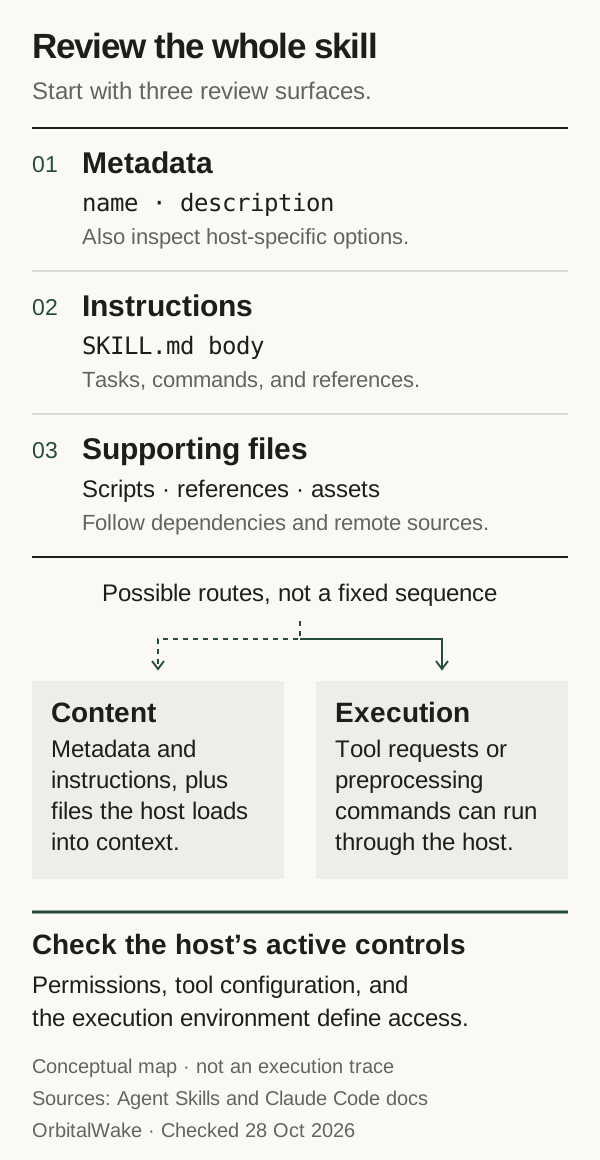
Figure 1. An original, documentation-based review map, checked on 28 October 2026. It groups the things to inspect rather than prescribing an execution sequence. Loading, preprocessing, and permissions vary by host and configuration. Sources: format, integration, and Claude Code skills.
Start with one sentence describing the job you want done. For example: “Summarize these local test results into a report.” Use that sentence to judge each requested action.
| Review surface | Questions to answer |
|---|---|
| Name and description | When is the agent being encouraged to select this skill? Does the description match your task? |
| Instructions | Which files, commands, accounts, and destinations does the workflow name? Does it ask to change unrelated settings? |
| Bundled code and dependencies | What do the helpers read, write, launch, install, or send? What additional code will be fetched? |
| References and assets | Do linked documents introduce further instructions or destinations? Are templates and example files appropriate for the data you will use? |
| Delivery package | Is this a standalone skill, or one component in a larger plugin? What else is enabled with it? |
Anthropic’s security guidance calls for inspecting bundled material, dependencies, and instructions that connect to external services. Reading the short description alone leaves most of that work undone. Security considerations
Inspect unfamiliar material outside your agent’s active skill directories first. Use a plain file viewer without enabling the package’s automation. The integration guide recommends a trust check before loading project skills from a repository; that is guidance for host implementers, not a guarantee that every client performs the check. Repository trust
Check the host’s execution paths
Claude Code extends the shared format. Its current documentation distinguishes several controls:
| Feature | What to account for in a review |
|---|---|
allowed-tools | Grants turn-scoped pre-approval, subject to explicit deny/ask rules and managed policy. Other tools retain their ordinary permissions; this is not a restrictive allowlist. |
disable-model-invocation: true | Controls automatic invocation. It does not establish file or network isolation. |
context: fork | Uses a separate subagent context. The field itself does not create an OS sandbox. |
| Dynamic context commands | Supported local skill content can run shell commands before reaching the model, subject to permission checks. Behavior differs by skill source and policy. |
These are documentation findings, not product tests in this article. Review the installed version and effective configuration before relying on them. In particular, inspect dynamic command placeholders as executable behavior; waiting to review only the model’s later tool choices is insufficient. Claude Code skills
For execution confinement, examine the applicable runtime boundary separately. Claude Code documents which processes its shell sandbox covers and which run outside it. Our permissions and sandboxing article explains that distinction in more detail. Sandbox scope
If the skill arrives in a plugin
A Claude Code plugin can bundle skills with agents, hooks, MCP servers, and other components. Review the unit you are installing, including components that the particular skill does not mention. Plugin composition
The plugin security documentation distinguishes model-requested tool calls from executable components such as hooks and local server processes. They do not all pass through the same approval or sandbox path. Check what starts at installation, enablement, session startup, or a lifecycle event; a prompt for one tool call is not a review of every component. Plugin execution
For the local process side of that review, see MCP server security before the first tool call.
Match access to the actual job
For the local-report example, identify an input directory and an output directory. Then ask why any other access is needed. A workflow that publishes the report will have a different access requirement from one that writes a local file.
Make the decision concrete:
| Resource | A review record should explain |
|---|---|
| Files | Which inputs are needed, where outputs go, and which other directories the execution environment can reach. |
| Credentials | Which account and operation require a credential, its scope, and how it reaches the process. |
| Network | Which destinations are needed and what data is sent to each. |
| Commands and packages | Which executables and dependencies run, including installation steps and wrappers. |
| Persistence | What remains after completion: files, logs, background processes, or changed configuration. |
This table is a review record we recommend, not a list of guarantees supplied by the skill format. Use the host’s effective settings and the environment’s actual controls to establish access. A sentence inside the skill saying it will only read one folder is not evidence that other paths are inaccessible.
Keep a small test representative of the intended job. Use made-up inputs and dedicated test credentials only if credentials are necessary. Observe the files and actions you care about, including unwanted side effects. Check failures against their actual causes: a missing dependency or an unavailable tool does not demonstrate that an access-control rule worked.
A small update that leaves the instructions unchanged
We constructed two versions of a report-writing skill. Each contained exactly two regular files: SKILL.md and scripts/report.py. Both used the same instructions. Both processed three synthetic records and wrote the same primary report.
We changed only the second version’s Python helper. Alongside the report, it wrote a harmless local diagnostic copy of the input. Our fixture explicitly launched both helpers; no agent selected or loaded either skill.
| Observation | Version 1 | Version 2 |
|---|---|---|
SKILL.md bytes | Identical | Identical |
| Bundled helper | Original | Changed |
Primary report.txt bytes | Identical | Identical |
| Files written | report.txt | report.txt and diagnostic-copy.json |
Comparing only the instructions would miss the changed helper. Checking only the primary report would miss the additional output. A complete inventory of relative paths and SHA-256 file hashes identified scripts/report.py as the changed file.
The added file contained only the expected synthetic input and stayed inside the temporary workspace. We designed the example to make this difference visible; it is not a discovered malicious skill, an attack-success measurement, or an estimate of how often real packages behave this way.
Reproduce the example
Download the Python source and save it as skill-update-review.py in a writable directory. Read it before running it. The recorded JSON result contains the file hashes, observations, environment, and scope limits.
python3 -I -S skill-update-review.py > skill-update-review-results.json
The source uses only Python’s standard library. It creates a temporary directory beside itself, explicitly runs the two authored helpers, and removes the temporary directory afterward. It implements no network operations. The redirected JSON file remains for inspection.
Our recorded run used Python 3.12.14 on Linux x86_64, as UID/EUID 0. The helpers received an empty environment and ran with Python’s -I -S options. Those options affect Python initialization; this fixture did not test an OS sandbox or network isolation. Repeating the example produced the same file hashes and observations.
All seven observation checks passed. That means the constructed example behaved as described. It says nothing about whether a real skill is safe or how Claude Code would execute it. No model inference, client permission prompt, third-party skill, or ordinary-user access-denial behavior was tested.
The inventory helper is intentionally small and written for our known fixture. It does not safely analyze every possible untrusted directory, follow a dependency graph, or inspect remote resources. Use it to understand the example, not as a general-purpose security scanner.
Keep the review attached to a version
Record the source repository or distribution URL, the exact revision, the files you inspected, the host version and relevant settings, and the result of your test. Store that record somewhere the package cannot silently replace along with its own files.
A digest helps identify which bytes were reviewed. It does not tell you who authored them, whether a dependency is trustworthy, or whether their behavior is acceptable. A pin also needs an update process: retaining an old revision indefinitely can retain old defects.
When an update arrives, review changed files throughout the package. Check new dependencies, altered destinations, changed permissions, and newly added components. Re-run the checks relevant to those changes. Claude Code’s plugin documentation notes that marketplace auto-update can replace plugin files in the background when enabled, so include the actual update mechanism in your record. Plugin updates
For the report-writing example, a useful decision would read: this reviewed revision processes these synthetic inputs, writes these outputs, and needs this access in this host. Any new destination, credential requirement, or executable component reopens that decision.
That record gives the next reviewer something specific to check when the package changes.
Sources & scope
Primary-documentation review checked on 28 October 2026, plus a constructed Python 3.12.14 example on Linux x86_64 as UID/EUID 0. Two authored helpers were explicitly launched with synthetic data. No agent client, model inference, third-party skill, permission prompt, network isolation, or sandbox enforcement was tested. The figure is a conceptual review map, not an observed execution trace.
- Agent Skills: Format specification
- Agent Skills: Client integration and trust considerations
- Anthropic: Equipping agents for the real world with Agent Skills
- Claude Code: Skills, tool pre-approval, invocation, and dynamic context
- Claude Code: Plugins overview
- Claude Code: Plugin security, execution paths, and updates
- Anthropic: Donating Agent Skills to the Agentic AI Foundation, 22 October 2026
- Claude Code: Sandboxing and its scope
Publishing details & corrections
Prepared with AI assistance. Sources, any tests performed, and their limitations are described in the article.
No material corrections recorded for this version.