If private data remains visible after logout, first identify where the displayed copy came from. Adding Cache-Control: no-store is useful for sensitive HTTP responses, but it does not revoke a session, erase every older copy, clear JavaScript state or define a service worker’s storage policy.
There are two different failures to investigate: an old screen remains visible, or a new operation still receives protected data. Both can matter, especially on a shared device, but they need different evidence and fixes. This guide separates those paths without treating every stale screen as proof of a shared-cache leak.
Does no-cache mean the response was never stored?
No. In RFC 9111, Sections 5.2.2.4–5.2.2.7, the ordinary, unqualified response directives have different jobs:
- no-cache: storage is possible, but reuse requires successful validation with the origin.
- private: a shared cache must not store the response; a private cache may store it subject to other constraints.
- no-store: a compliant private or shared HTTP cache must not store this request/response or use the response for another request.
These are not synonyms. The examples here exclude field-qualified forms and special combinations such as must-understand, which have additional semantics. The RFC also warns that no-store is not sufficient privacy protection against malicious caches or eavesdropping.
For a sensitive account response, prefer a deliberate no-store policy over hoping that authentication makes caching impossible. For non-sensitive, user-specific content that may be retained but must be checked before reuse, private with no-cache serves a different goal. MDN’s reference also notes that cookies alone do not make a response private. Do not confuse must-revalidate with no-cache: the former requires validation once a stored response is stale, not on every reuse while fresh.
Which storage system supplied the screen?
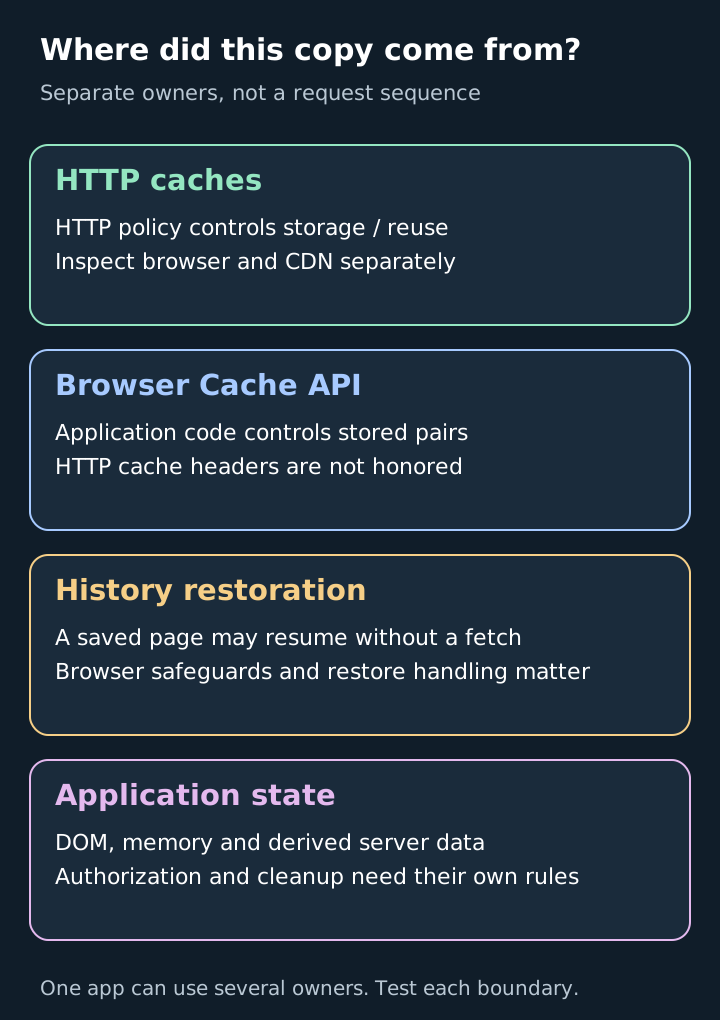
This is a classification map, not a request sequence. A single application can use several boxes at once.
HTTP cache. Determine whether the response came from the browser’s HTTP cache, a CDN or the origin. Record a sanitized route/URL with credentials and personal identifiers removed, response policy, relevant cache-status evidence and whether validation occurred. A network request returning an unchanged representation is different from fetching a fresh body. Do not record bearer tokens or actual private response bodies in a diagnostic ledger.
Browser Cache API. A service worker can intercept requests and serve stored Request/Response pairs, and window code can also use this API. MDN states that this API does not honor HTTP caching headers. Entries do not automatically follow your new HTTP freshness policy. Inspect application-controlled write, lookup, account partitioning and deletion paths. Browser eviction is possible, so storage is not guaranteed permanent either. This refers to the browser API, not similarly named CDN products.
Back/forward cache. A browser may restore a saved page and its JavaScript state rather than perform a normal HTTP fetch. Chrome’s documented change, updated September 9, 2025, allows eligible no-store pages into this cache. Chrome also documents safeguards, including eviction on cookie or other authorization changes. Therefore neither “no-store always prevents history restoration” nor “Chrome always retains the page after logout” is a sound rule. Check the target browser/version and the application’s restore handling, including pageshow with persisted when applicable.
Application state. A rendered DOM, in-memory query cache or server-side result cache has its own lifecycle. Clear or replace account-specific UI state on account changes, and enforce current authorization at the data-access boundary. A clean-looking logout screen cannot demonstrate that the server refuses subsequent access.
Why did changing the header fail to remove an older response?
Consider this fictional diagnostic trace, not an executed experiment:
- At T0, a response is stored under an earlier policy that permits a fresh cached copy.
- At T1, the origin starts sending no-store for new responses.
- At T2, a client reuses the still-fresh T0 copy without reaching the origin.
The T1 policy change cannot act on a request the origin never receives. OWASP’s cache guidance explicitly distinguishes stopping new storage from purging old entries. A migration therefore needs an inventory of existing copies, a supported invalidation or cleanup plan for each owner, and a test with a cache warmed under the previous policy. Testing only a fresh browser profile misses this case.
Logout also needs its own session/token handling. Cache cleanup is not a substitute for correct refresh-token lifecycle behavior, and permission revocation must cover derived application data too. Neither related control can recover copies a recipient already exported.
Can the CDN behave differently from the browser?
Yes. Check the effective edge configuration, not just the header visible in the browser. Cloudflare’s Origin Cache Control documentation describes policy interactions and differences when Origin Cache Control is enabled or disabled. For example, no-cache can mean storage with validation under one configuration and no caching under another. Edge Cache TTL rules can change edge behavior independently of downstream policy.
This is a reason to inspect existing rules and deployment evidence, not to weaken a sensitive route’s controls. A static asset strategy should not accidentally apply to account pages. Verify what happens for authenticated responses and after any rule change; a cache-hit indicator alone does not tell you whether the returned representation belongs to the correct account.
What evidence closes the investigation?
Use synthetic accounts and data in an authorized test environment. For each case, record the storage owner, prior state, action, expected result and observed result:
- Warm then log out: distinguish a restored old screen from a new protected read. Record both outcomes.
- Switch accounts: warm as account A, switch to B, then repeat the same application operation. Check UI state and authorization, not only the status code.
- Change policy: warm under the old policy before deploying the new one. Verify cleanup separately from future storage prevention.
- Restore history: navigate away and back in supported browser versions. Check whether restoration occurred and what the application does before showing sensitive state.
- Traverse the real path: include the service worker and CDN where deployed. A direct-origin request does not test them.
These are proposed checks, not results obtained for your application. Define failure before testing: protected data served to the wrong identity, a new protected read succeeding after revocation, or retained screen content violating the product’s shared-device policy. Keep those findings separate. If sharing diagnostics, sanitize HAR files before handing them over.
The useful conclusion is not “we added a header.” It is: we identified each retained copy, assigned its lifecycle to an owner, and verified the relevant access and cleanup behavior.
Sources & scope
Standards and browser/CDN documentation review with a fictional diagnostic trace. No cache experiment or third-party security test was performed.
- RFC 9111, HTTP Caching, June 2022
- MDN Cache-Control reference
- MDN browser Cache API
- Chrome back/forward cache and no-store, updated September 9, 2025
- Cloudflare Origin Cache Control
- OWASP Web Cache Security Cheat Sheet
Publishing details & corrections
Prepared with AI assistance. Sources, any tests performed, and their limitations are described in the article.
No material corrections recorded for this version.