Use /compact to continue the same work with a shorter conversation; use /clear when moving to unrelated work; use /resume to return to a saved session. None of those choices should be treated as proof that the next edit is correct. After a long session, the useful question is not just “How many tokens are left?” It is “Which facts will the next action rely on, and where can I check them?”
This guide concerns Claude Code’s CLI and its documented context handling, not an API response that stopped generating. For that different symptom, see our response-truncation guide. Sources were checked on November 1, 2026 (JST). These are living documents without a single page-wide release version; this is a current-documentation review, not a test of a pinned CLI version. We did not run a Claude Code recovery experiment.
What changes when the context window fills?
Claude Code automatically summarizes a conversation near its context limit. /context shows usage; /compact can take focus instructions. Thresholds depend on configuration, so avoid a universal percentage rule. Context-window documentation
Our practical distinction is three separate things: the conversation available to the model, persistent instruction or memory files, and the current repository. A useful summary can preserve a decision while omitting the evidence that established it. A repository file can remain on disk without being present in the next model input. Keeping these separate makes a recovery plan inspectable.
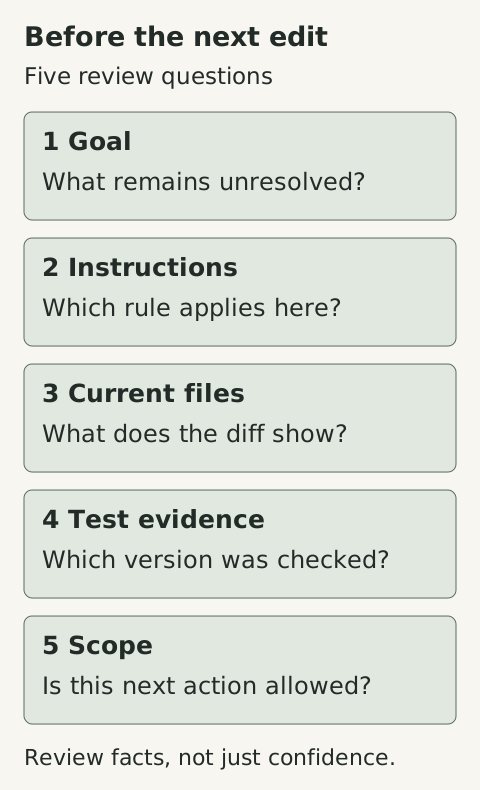
An original review checklist, not a measured execution trace or a guarantee of recall.
Which instructions and files come back?
Current documentation distinguishes root CLAUDE.md and unscoped rules, which are re-injected, from nested instructions and path-scoped rules that reload on demand. Some recent files are reread; do not assume the whole repository returns. What survives compaction
For a missing instruction, first check whether it existed only in chat, lives in a nested file that has not reloaded, or depends on a matching path. /memory helps inspect the instruction files; /context can confirm startup memory-file loading. Root instructions are a place for durable project guidance, not a transcript dump. They guide model behavior and are not an enforcement boundary. Memory troubleshooting
There is also a distinction inside auto memory: the startup index has a documented limit of 200 lines or 25 KB, whichever comes first; topic files are read when needed. A note being saved does not establish that its full text is already in context. Auto memory
Before a consequential continuation, ask for the relevant file and evidence to be checked again. That is a targeted verification step, not a demand to reread every source after every compact.
Should I compact, clear, resume, or rewind?
| Situation | Useful starting point | What to verify afterward |
|---|---|---|
| Same task, chat is crowded | Compact with the unfinished decision in focus | Task and files still match; check background work before retrying |
| A genuinely unrelated task | Clear, after saving necessary unfinished-work context | The new task is not relying on an unstated old decision |
| Return to an earlier saved task | Resume the intended session | Project, files and outstanding operations still match its assumptions |
| An unwanted edit needs undoing | Inspect the rewind options and version-control diff | Which files and chat state will be restored |
This is our decision aid, not a claim that the commands are interchangeable. Compaction does not cancel background commands or subagents; inspect outstanding work before repeating it. Context-window documentation Resuming a compacted session restores its last summary, messages left unsummarized, and later messages. It does not reload the earlier history that was summarized. The documented resume behavior also does not automatically rerun a tool interrupted when the previous process ended. Session restoration
Summarization does not change files on disk. Rewind offers different conversation and code actions, and its file coverage has limits; it is not a replacement for version control. Do not choose a restore option merely to reduce token usage. Checkpointing
A handoff that separates evidence from assumptions
Suppose a fictional migration task is halfway finished. A vague handoff says, “Migration done; tests mostly pass.” That compresses away exactly what the next session needs to question. A more useful note is:
Goal: change the invoice parser, preserving the exported field names.
Current files: src/invoice-parser.ts and tests/invoice-parser.test.ts.
Decision: keep decimal amounts as strings; the API contract requires it.
Evidence: contract section 3; inspect it before changing the representation.
Last observation: the focused parser test passed before the latest edit.
Not verified: the latest edit and the full test suite.
Next step: inspect the diff, then run the focused test on current files.
Boundary: no production migration or deployment is authorized by this note.
These paths, results and contract are invented to explain the format; they are not files or tests from an actual project. Notice that the note preserves the age of the evidence. “Passed before the latest edit” cannot honestly become “current code verified.”
Before relying on such a note, review it against the actual diff, task requirements and test output. Remove credentials, customer data and unnecessary private details. A durable handoff can itself preserve an error, so write its factual basis, not just the assistant’s confident conclusion. Keep it in an appropriate project location rather than automatically promoting every temporary detail into global instructions.
How do I know the continuation is on track?
Our suggested acceptance check is small and concrete:
- Can the assistant identify the next unresolved decision without inventing completed work?
- Can it point to the current file or authoritative requirement that supports that decision?
- Are previous test results tied to the version they actually checked?
- Does the proposed action stay within the task’s approved scope?
If an answer is missing, supply the relevant evidence before allowing a larger edit. If the assistant remembers the rule but still violates it, repeating the rule more forcefully is not a reliable control. Claude Code’s best-practices guide distinguishes model-read instructions from configured checks and permissions. Select those controls for their actual scope rather than expecting prose to guarantee behavior. Best practices Our permissions and sandboxing guide covers that separate boundary.
No particular checkpoint format guarantees recall, correctness, lower cost, or safe execution. The value is narrower: a reviewer can see what was decided, what supports it, what remains uncertain, and what the next action is allowed to do.
Sources & scope
Review of current Claude Code documentation with an original recovery diagram and fictional handoff example. No Claude Code session, compaction benchmark, or live recovery experiment was run.
- Claude Code — Explore the context window
- Claude Code — How Claude remembers your project
- Claude Code — Manage sessions
- Claude Code — Checkpointing
- Claude Code — Best practices
Publishing details & corrections
Prepared with AI assistance. Sources, any tests performed, and their limitations are described in the article.
No material corrections recorded for this version.