If GitHub Actions stops assuming an AWS role after a repository or workflow change, compare the OIDC subject before broadening the trust policy. Adding an environment can change the job-context portion. Creating, renaming, transferring, or opting in a repository can change its identity format. A copied branch-only example may no longer describe the job you intend to authorize.
This is a diagnostic guide for GitHub.com Actions and AWS IAM, checked November 1, 2026. It is not a universal explanation for every access-denied error. The examples below are fictional string comparisons, not captured tokens or tested cloud deployments.
Did token issuance fail, or did AWS reject role assumption?
Separate three stages before editing anything:
- Requesting an OIDC token. The job needs
id-token: write. That permission enables the token request; it does not itself grant permission to write AWS resources. - Exchanging it for role credentials. Check the intended role, identity provider, audience and subject conditions. With the official AWS action in the standard setup, the documented audience is
sts.amazonaws.com. - Using the role credentials. A later denied resource operation is a different question from a failed role assumption. Do not use a broader trust policy to fix a missing resource permission.
The first two stages are documented in GitHub’s AWS OIDC guide. AWS distinguishes the role’s trust policy, which controls who may assume it, from its permissions policy, which controls actions and resources. AWS role documentation
Our practical recommendation: preserve the failing stage and error message in a redacted incident note. “AWS access failed” is too broad to choose a safe repair.
Why did adding an environment break the branch match?
In GitHub’s default subject construction, a job referencing an environment uses an environment context. Without an environment, a pull-request event uses its own context; otherwise branch or tag context applies. An environment is not simply appended to a branch subject. Custom subject templates require separate inspection. Subject construction
Consider this fictional legacy-format repository. The policy expects:
repo:demo/app:ref:refs/heads/main
The job then adds environment: prod, producing:
repo:demo/app:environment:prod
Those strings differ even if the run still originates on main. Changing an unrelated S3 permission would not make that comparison equal. But copying the second string into trust is not the entire security decision: which branches and tags may enter prod?
AWS recommends environment protection with deployment branch/tag restrictions. Review those restrictions alongside the cloud trust change; do not treat the environment’s name as proof that only the intended branch can use it. AWS environment guidance
Why does a new repository have IDs in its subject?
GitHub’s April 23, 2026 announcement, corrected June 10, specifies @ between names and immutable IDs. Repositories created after July 15, 2026 use this format; renames and transfers after that date also adopt it. Older repositories can opt in. The rollout does not apply to GitHub Enterprise Server. The change addresses the risk of recycled names matching stale cloud trust. Dated announcement
A fictional immutable-format counterpart is:
repo:demo@123/app@456:environment:prod
Here 123 and 456 are invented owner and repository IDs. They are not interchangeable, and a name-only policy does not match this string exactly. Do not guess IDs or replace the identity with a wildcard to recover a green build. Check the repository’s applicable subject configuration and the intended trust boundary.
The useful comparison has two independent dimensions: identity prefix and job context. Fixing only the environment suffix can leave an immutable-prefix mismatch unresolved.
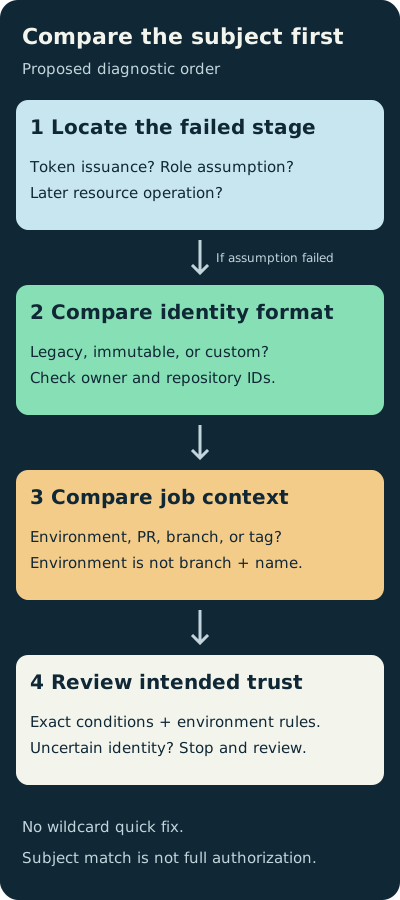
Original diagnostic order, not an AWS policy simulator. A matching subject alone does not prove that all authorization requirements pass.
What should I compare without leaking a token?
Prepare a short review record with these fields:
- The failing stage, intended role and intended deployment source.
- Repository subject mode: legacy, immutable, or customized; any recent rename, transfer or opt-in.
- Job context: environment, pull request, branch or tag.
- Expected audience and subject conditions; the smallest relevant, redacted claim evidence available through your authorized diagnostic process.
- The policy owner’s decision about which identities should be allowed—not merely which string would silence the error.
Do not paste a complete signed token into a public issue or an online decoder. This guide intentionally provides no token-dumping command. Treat diagnostic material as sensitive, and distinguish examining decoded text from verifying a signed token. For the same minimization principle in browser diagnostics, see our HAR-sharing checklist.
Is a repository-wide wildcard a safe quick fix?
It changes the question from “does this intended deployment identity match?” to “what additional jobs can now match?” GitHub’s AWS guide shows that a repository-wide subject wildcard can include branch, pull-request and environment contexts. That is broader authorization, not a neutral troubleshooting technique. Wildcard scope
IAM rejects certain missing, null or solely wildcard GitHub subject conditions when trust is created or updated. That validation is not an endorsement of every broader pattern it accepts. IAM’s check
Before approving a repair, require an explanation of both an intended matching case and an unintended case that remains excluded. If you cannot explain the exclusion, stop and review the boundary instead of expanding it.
Environment protections also have availability and configuration limits. GitHub documents plan/repository-visibility differences, and a workflow can create a previously nonexistent environment without protection rules in the ordinary case. Verify the actual configured environment rather than assuming a familiar name carries approval requirements. Environment management
A precise subject match still does not make arbitrary code inside an authorized job trustworthy. Review what executes there, including dependencies and workflow changes. Our workflow-lockfile review guide covers that adjacent question; it does not replace IAM trust review.
Sources & scope
Primary GitHub and AWS documentation, an original diagnostic diagram, and fictional subject comparisons. No real token collection, cloud configuration changes, or AWS integration tests.
- GitHub OIDC reference
- GitHub OIDC in AWS
- Immutable subject claims announcement and correction
- AWS role trust for GitHub OIDC
- GitHub deployment environment protection
Publishing details & corrections
Prepared with AI assistance. Sources, any tests performed, and their limitations are described in the article.
No material corrections recorded for this version.