An S3 presigned URL cannot outlive the credentials used to sign it. Asking an SDK for a seven-day URL does not make a short-lived role session last seven days. Authorization and policy restrictions can also reject the request before the requested URL expiry. AWS presigned URL guide
For a backend engineer debugging downloads, increasing the expiry parameter is therefore not the first fix. Identify which limit stopped the request, then decide whether your product needs a longer-lived link or a way to obtain a fresh one.
This guide covers direct Amazon S3 Signature Version 4 URLs. CloudFront signed URLs, presigned POST policies, and other S3-compatible services need their own review. The timing example is fictional, not an AWS experiment.
Read the three limits separately
The signed request carries X-Amz-Date and X-Amz-Expires. The latter is a duration in seconds, not an absolute timestamp; the documented SigV4 range is 1–604800 seconds. The signature also binds request details. Editing the duration in an existing URL is not a renewal. Query-string authentication
Your review needs three separate records:
- Requested URL deadline: the signed timestamp plus the requested duration.
- Signing credential deadline: the expiration of the particular temporary credentials used for that URL.
- Applicable policy: permissions, explicit denials, network conditions, and any signature-age restriction when the request is evaluated.
A useful engineering model is an upper bound, not an availability guarantee: for otherwise valid requests, the earliest applicable time limit wins. Object availability, request correctness, and other access conditions still matter.
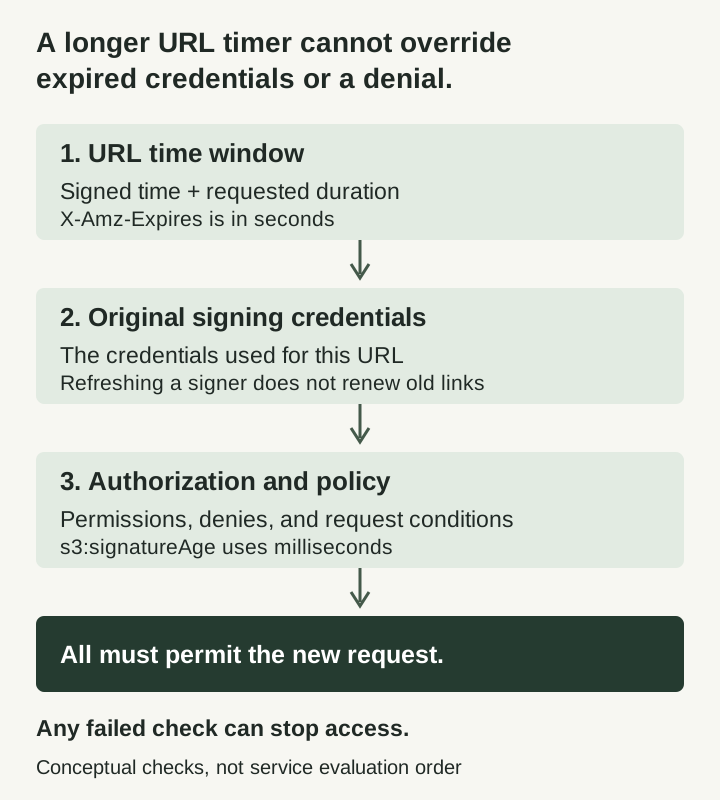
This is a decision diagram, not a measured lifetime or service-level guarantee.
Consider this fictional case, with all times in UTC:
| Item | Value | Consequence |
|---|---|---|
| URL signed | 09:00 | Starting point for this example |
| Requested duration | 3,600 seconds | Requested deadline: 10:00 |
| Signing session expires | 09:20 | A new request at 09:30 cannot rely on that session |
| Applicable signature-age deny | Older than 600,000 milliseconds | A request at 09:11 is already too old |
Without that signature-age rule, 09:20 would still limit the one-hour URL. With the rule, the 09:11 request fails even though both the URL’s requested window and the session remain unexpired. These are deliberately separated test times, not a claim about exact boundary rounding.
AWS documents s3:signatureAge in milliseconds. It compares age against the signed time and can shorten validity, never extend it. That time is supplied by the signer: it is not an independent record of when your application actually created or delivered a link. Keep clocks correct and avoid treating the condition as a complete issuance audit. Guardrails and their limitations
Diagnose the error before changing the lifetime
Preserve a sanitized error code and request time. An HTTP 403 alone does not identify the cause.
| Observation | First check | Do not conclude |
|---|---|---|
ExpiredToken | Expiration of the credentials that signed this URL | A larger requested URL duration fixes it |
SignatureDoesNotMatch | Method, signed headers, query parameters, and clock correctness | Every signing failure is expiration |
AccessDenied | Required permission and applicable deny conditions | The signature must be malformed |
| Initial download works; later retry fails | Time of the new request relative to the limits | The initial transfer proves future requests will work |
These diagnostic starting points follow AWS’s troubleshooting guidance. S3 checks expiry when a request begins: a download already underway can continue across the deadline, while a restart afterward can fail. AWS presigned URL troubleshooting
Refreshing the backend’s credential provider is useful for new signing operations. It does not rewrite a URL already emailed, queued, or stored by a client. That follows from the URL containing a signature tied to its original credential context. A delivery delay can consume much of the usable window before anyone clicks.
Offer a fresh link, not a misleading promise
For an authenticated download portal, one design to evaluate is a stable application route that checks the user’s current entitlement and issues a short-lived S3 URL when needed. This is a design proposal, not a tested reference implementation.
The application route needs its own authorization, tenant isolation, abuse controls, and careful handling of object identifiers. Retrying issuance must not become a way to bypass a revoked entitlement. A browser’s previous login is not enough if the entitlement has since changed.
Record the requested lifetime and the known credential expiration separately. If your signing interface does not expose the latter reliably, do not label the link “guaranteed valid until” the requested deadline. Build a refresh path and test it under the actual deployment’s credential provider. Prefer solving the user journey over introducing permanent access keys simply to keep a URL alive; AWS recommends temporary credentials. Credential and guardrail guidance
A fresh link is not a single-use link. AWS documents that presigned requests can be reused, and that possession is enough to present them subject to other checks. If the product requires one-time redemption, that needs a separate mechanism and threat model. AWS FAQ
Plan for leakage without widening the incident
Treat a working presigned URL as temporary access material. AWS recommends removing the signature, removing the query string, or protecting the recorded URL as highly confidential. Your application’s analytics, support tooling, and client logs deserve the same review; TLS does not prevent a participating client from recording its own request. Logging interactions
For support, prefer an internal correlation ID, operation, timestamps, sanitized error, and non-secret credential-provider description over pasting a live URL. Before sharing browser traces, use the HAR review checklist.
Revocation also has a scope. Removing a principal’s permissions or revoking older role-session permissions can affect other valid uses, not just one leaked link. AWS describes these effects explicitly. Review the blast radius before choosing a response. Revocation options
As with RAG permission revocation, stopping future access cannot retrieve a copy someone already downloaded.
What to test in your own environment
Use non-sensitive fixtures in a permitted test account. These are proposed checks, not results from this article:
- Compare the requested deadline with the actual signing-session expiration.
- Try a new request before and after each applicable limit, with a valid-access control case.
- Verify that a new URL uses refreshed credentials while the old URL remains unchanged.
- Exercise a delayed click and a restarted download, not only the first successful request.
- Revoke an application entitlement and verify that the refresh route refuses a new link.
- Inspect sanitized logs to ensure debugging did not preserve reusable access material.
The goal is a download experience whose failure and renewal behavior you understand, rather than a large expiry number that the rest of the system cannot honor.
Sources & scope
AWS documentation review with an original fictional timing example and diagnostic checklist. No AWS requests, policy changes, or cloud experiments were performed.
- AWS — Download and upload objects with presigned URLs
- AWS — Authenticating requests using query parameters
- AWS — Additional presigned URL guardrails
- AWS — Presigned URL FAQ
- AWS — Logging interactions and mitigations
Publishing details & corrections
Prepared with AI assistance. Sources, any tests performed, and their limitations are described in the article.
No material corrections recorded for this version.